Repository Pattern in Android Jetpack Compose: Complete Guide with MVVM Architecture
Learn how to implement the Repository Pattern in Android Jetpack Compose using Kotlin and MVVM architecture. This complete guide explains what the repository pattern is, why developers use it, its benefits, clean architecture principles, and step-by-step implementation with practical examples for modern Android app development.
Repository Pattern in Android Jetpack Compose
Modern Android app development is evolving rapidly with technologies like Jetpack Compose, Kotlin Coroutines, Flow, Room Database, and Retrofit. As applications become larger and more complex, managing data efficiently becomes one of the biggest challenges for Android developers.
This is where the Repository Pattern becomes extremely useful.
In this guide, you will learn:
- What is Repository Pattern in Android
- Why Repository Pattern is important
- Benefits of using Repository Pattern
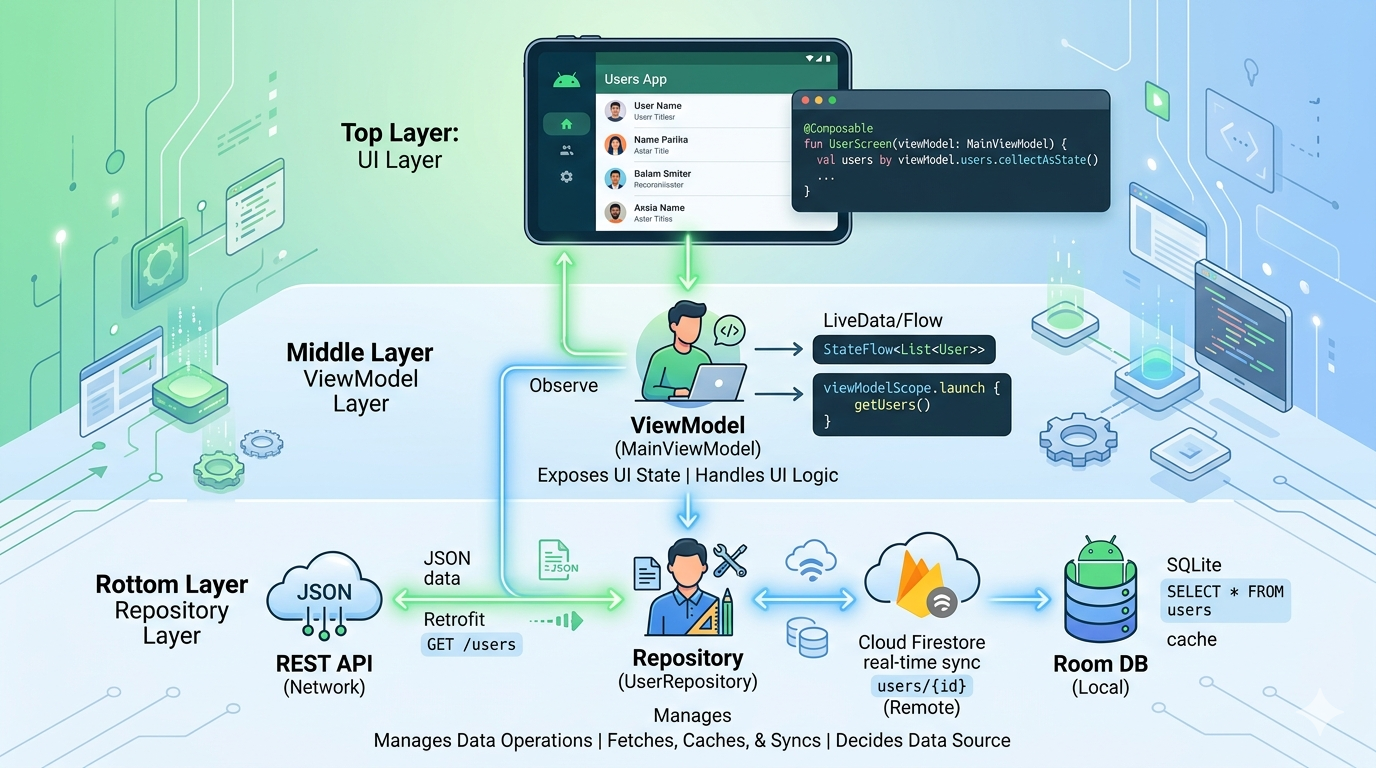
- How Repository Pattern works with MVVM
- How to implement Repository Pattern in Jetpack Compose
- Best practices for clean architecture in Android
What is Repository Pattern in Android?
The Repository Pattern is a software design pattern that acts as a bridge between the data sources and the rest of the application.
A repository handles data operations and abstracts the source of the data. The data may come from:
- Remote APIs
- Local Room Database
- Firebase
- Cache
- Local files
Instead of directly accessing these sources from the ViewModel or UI layer, developers use a repository class.
Simple Flow
UI (Compose Screen) ↓ ViewModel ↓ Repository ↓ Data Sources (API / Database)
The repository becomes the single source of truth for your application data.
Why Use Repository Pattern in Android?
Without Repository Pattern, your ViewModel may directly communicate with APIs or databases. This creates tightly coupled code and makes the project difficult to maintain.
The Repository Pattern solves these problems by separating concerns.
Problems Without Repository Pattern
- Large and messy ViewModels
- Difficult testing
- Duplicate code
- Hard dependency management
- Poor scalability
- Difficult migration between data sources
Problems Solved by Repository Pattern
- Clean code structure
- Better separation of concerns
- Easier unit testing
- Improved scalability
- Better maintainability
- Centralized data management
Benefits of Repository Pattern in Jetpack Compose
1. Clean Architecture
The repository separates business logic from UI logic.
2. Easy Testing
Repositories can be mocked easily during testing.
3. Better Code Reusability
Multiple ViewModels can use the same repository.
4. Centralized Data Handling
All API calls and database operations are managed in one place.
5. Easy Data Source Switching
Only repository changes, UI stays same.
6. Offline Support
Supports API + Room database combination.
Repository Pattern with MVVM Architecture
Compose UI → ViewModel → Repository → Data Sources
Implementation Example
Data Model
data class User( val id: Int, val name: String )
API Service
interface UserApi { suspend fun getUsers(): List<User> }
Repository
interface UserRepository { suspend fun getUsers(): List<User> }
class UserRepositoryImpl( private val api: UserApi ) : UserRepository { override suspend fun getUsers() = api.getUsers() }
ViewModel
class UserViewModel( private val repository: UserRepository ) : ViewModel() {
val users = MutableStateFlow<List<User>>(emptyList())

fun loadUsers() {
    viewModelScope.launch {
        users.value = repository.getUsers()
    }
}
}
Compose UI
@Composable fun UserScreen(viewModel: UserViewModel) { val users = viewModel.users.collectAsState()
LazyColumn {
    items(users.value) {
        Text(it.name)
    }
}
}
Benefits Summary
- Scalable architecture
- Clean code
- Testable components
- Better separation of concerns
- Easy maintenance
Conclusion
Repository Pattern is essential for modern Android development with Jetpack Compose and MVVM. It helps build clean, scalable, and maintainable applications.